
 jimmyandCursor
3d444d1cb5
jimmyandCursor
3d444d1cb5
Move the app under src/, add ring-spanning patterns with shared fonts and
beat-driven motion, and wire global audio settings into the web UI.

Co-authored-by: Cursor <cursoragent@cursor.com>
portal
Hexagonal LED portal: five WS2812 matrix panels on Pico UDP adapters, plus a bare floor.
Reference: photo of the physical portal — upright flat-top hex arch, dark frame, red LED grids on each face.
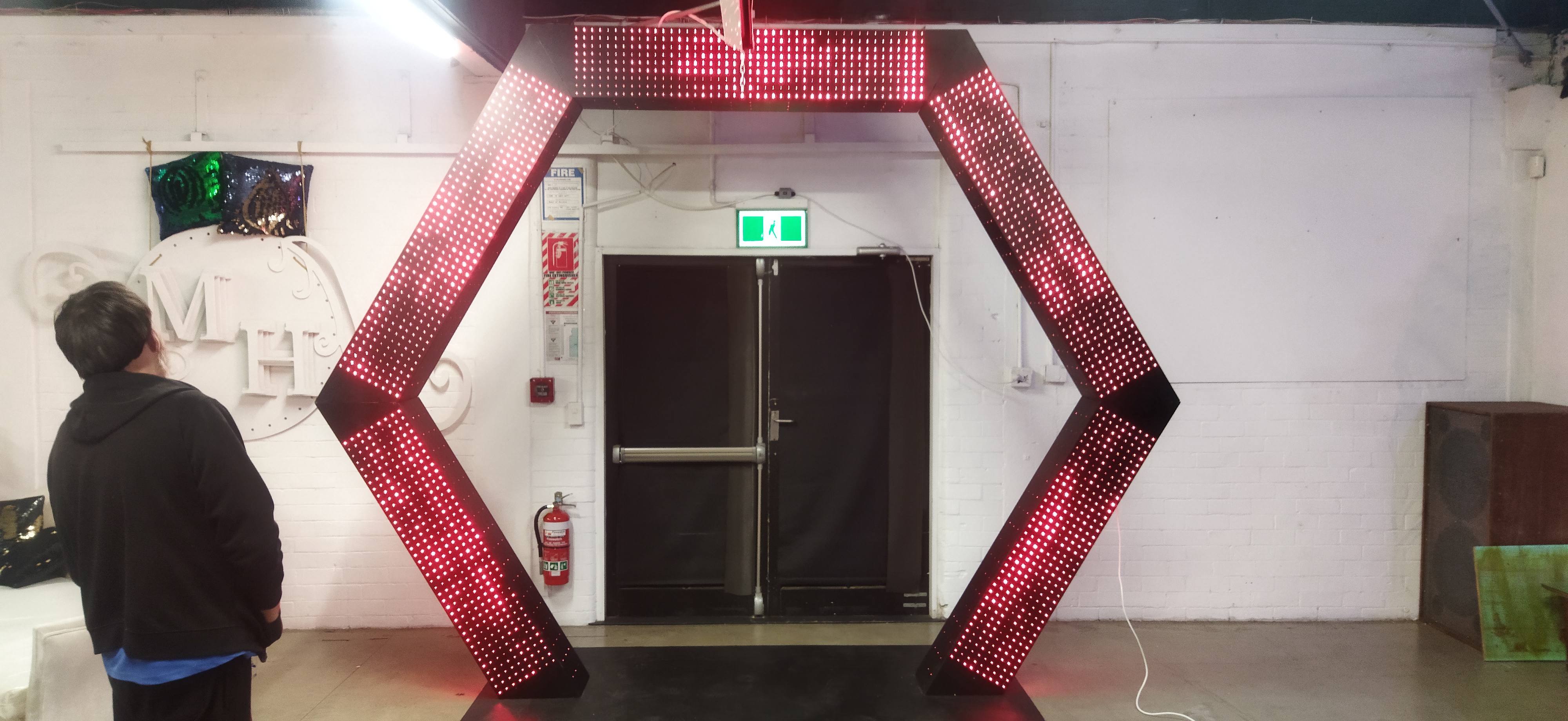
        ___[2]___
       /         \
     [1]           [3]
      |             |
     [0]           [4]
      \___________/
         floor
WS2812 control for Raspberry Pi 5 (orchestrator) and Pico panel firmware.
| Path | What |
|---|---|
src/ |
Python app, web UI, patterns |
test/ |
Unit tests and hardware panel scripts |
firmware/ |
Pico SDK panel firmware |
Panel IPs
Five Pico panels on 10.1.1.10–10.1.1.14. Examples drive all 5 by default.
Panel sizes
Panels are 9 rows tall; width varies by panel. Edit PANEL_WIDTH_BY_INDEX in src/leds/array_config.py:
| Panel | Face | IP | Size | LEDs | Firmware |
|---|---|---|---|---|---|
| 0 | bottom-left | 10.1.1.10 | 9×39 | 351 | make deploy PANEL_ID=0 |
| 1 | top-left | 10.1.1.11 | 9×45 | 405 | make deploy PANEL_ID=1 |
| 2 | top | 10.1.1.12 | 9×45 | 405 | make deploy PANEL_ID=2 |
| 3 | top-right | 10.1.1.13 | 9×45 | 405 | make deploy PANEL_ID=3 |
| 4 | bottom-right | 10.1.1.14 | 9×39? | 351 | make deploy PANEL_ID=4 |
Panels 0→1→2→3→4 run clockwise from bottom-left (PORTAL_PANEL_ORDER_CLOCKWISE in src/leds/array_config.py).
Panel 4 may be 38 or 39 wide — find the exact width:
make deploy PANEL_ID=4
pipenv run python test/panel_sync_test.py --test width --panel-index 4
Last column that lights → set PANEL_WIDTH_BY_INDEX[4] in src/leds/array_config.py to column + 1 (342 LEDs for 38, 351 for 39). Firmware takes pixel count from each UDP frame — no re-flash for width changes.
Animations render at each panel's own width automatically.
Patterns
Each visual lives in its own file under src/patterns/. Drop a new .py file there and the web UI picks it up without restarting (hot-load). Every file is also a standalone CLI:
pipenv run python src/patterns/scanner.py
pipenv run python src/patterns/scanner.py --brightness 0.3 --speed 2 --beam ff0000
pipenv run python src/patterns/rainbow.py --panel-index 1
A pattern subclass declares optional named colours (shown as colour pickers in the UI) plus brightness and speed (time scale, independent of the 15 fps UDP cap):
from leds.pattern import Color, Pattern, run_cli

class Scanner(Pattern):
    id = "scanner"
    label = "Scanner"
    fps = 35
    colors = {"beam": Color("#ff0000")}

    def draw(self, surface, t, params):
        ...

if __name__ == "__main__":
    run_cli(Scanner)
t is elapsed seconds × speed. Hardware brightness is applied when frames are sent, not inside draw.
Examples
Portal web controller
Drive all five Pico panels from the browser. Starts black until you select a preset.
pipenv install fastapi "uvicorn[standard]"
pipenv run dev
# open http://localhost:8765/
Play by tapping preset buttons. Switch to Edit mode to add or edit presets — each preset is based on a pattern (colours, brightness, speed). Try previews without saving; Save persists to db/presets.json. Saving a file in src/patterns/ updates the pattern list without a full page reload.
pipenv run dev enables uvicorn reload for src/leds/ + src/static/ and browser auto-reload when src/static/ files change. Pattern files are hot-loaded in-process (not via uvicorn). Disable with pipenv run python src/main.py --no-reload or --no-browser-reload.
Options: --host 0.0.0.0 --port 8765 to view from another device on the network.
Open via the server URL (http://…:8765/) — do not open index.html directly from the filesystem (file://), or module imports will fail.
Frontend uses Web Components and ES modules under src/static/js/:
| Module | Role |
|---|---|
<portal-app> |
Root layout, status, hot-load events |
<portal-controls> |
Preset buttons, Run/Edit mode |
<portal-preset-editor> |
Create/edit preset from a pattern |
Pico panel (UDP)
WS2812 defaults: GP28 (strip 0) and GP27 (strip 1). Override over UDP:
pipenv run python test/panel_color_test.py --panel-index 0 --pins 28:405,27:351
| Command | What it does |
|---|---|
pipenv run python test/panel_rgb_cycle.py |
Red / green / blue on all 5 panels |
pipenv run python test/panel_color_test.py |
One-shot RGB + white test |
pipenv run python test/panel_test.py |
Layout tests (corners, rows, chase) |
pipenv run python test/panel_sync_test.py |
Positioning + sync across all panels |
pipenv run python test/panel_animations.py |
All patterns on all panels |
pipenv run python test/panel_animations.py rolling |
One pattern (playlist runner) |
pipenv run python src/patterns/rolling.py |
One pattern, standalone |
pipenv run python test/panel_text.py |
Show your name |
Single panel only:
pipenv run python test/panel_animations.py --panel-index 1 # 9×45 @ 10.1.1.11
Pi 5 overlays (bench / local strips)
Optional local PIO tests on GPIO — not used for the five portal panels:
pipenv run python test/setup_pi5_leds.py --install
Colors use logical RGB everywhere ((255,0,0) = red). Pico firmware remaps to GRB on the wire; Pi SPI uses the same swap when needed. The web preview stays logical RGB.
# Logical RGB — firmware converts to GRB on the wire:
# (255, 0, 0) is red
pipenv run python test/panel_rgb_cycle.py # same colors over UDP
Firmware
Pico SDK sources live under firmware/pico/ (see that README for the UDP protocol).
make deploy PANEL_ID=0
make reset && make monitor